Make a chore chart your kids will actually use
Type their name and chores, pick a look, and print it for the fridge. Or put it on a tablet and let them tap chores off in Kid mode. Add an amount to each chore and it works out their allowance too. Free, no sign-up.
Pay for chores
Turn on allowance to set an amount for each chore. Then tap what they finished and ChoreWorth adds up what you owe them.
Payday calculator
Tap each chore they finished this week. The total is what you owe them.
1Type their chores
Pick from common chores or write your own. Every chore gets a picture so kids who can't read yet can follow along.
2Pick a look
Sunny and Chalkboard are free. Pro adds Ocean, Space, Garden and an ink-saving black and white version.
3Print and stick it up
Print it for the fridge, or open Kid mode on a tablet or phone and let them tap chores off. Install ChoreWorth on the home screen to use it like an app.
Free for everyday use. Pro or Plus when you want more.
Free
- Custom charts with a picture for every chore
- 6 looks, including ones made for allowance, little kids, big kids and routines
- Unlimited printing
- Allowance amounts on the chart
- Kid mode for one child
- Payday calculator for your first 4 weeks
- Install it on any phone, tablet or computer
Pro
- Everything in Free
- 10 more looks, like Ocean, Space, Dino Park and Robots
- Charts and Kid mode for up to 6 kids
- A reward goal on every chart
- The payday calculator every week
- No website line on your printouts
- Family sync on every device (free for the first 2 weeks)
PLUSChoreWorth Plus
or $19.99/year · cancel anytime
- Everything in Pro
- A new chart look every month
- Savings bank, goals and a reward store
- Streaks, badges and a weekly report
- Printable award certificates
Everything a chore chart should do
ChoreWorth turns the chart on your fridge into something your kids want to fill in, and it does the allowance math for you.
A picture for every chore
Each chore gets a simple picture, so kids who can't read yet still know what to do.
Allowance that adds itself up
Set what each chore pays. The chart shows what every check is worth, and the payday calculator totals the week for you.
Kid mode they can tap
Hand over a tablet or phone and they tap each chore as they finish it, with stars along the way and a celebration when they're done.
Print it or skip the paper
Print a clean chart for the fridge on US Letter or A4, or track everything on screen instead.
Charts for every age
Picture charts for preschoolers, weekly charts for big kids, and step-by-step morning and bedtime routines.
Free, private, no sign-up
No account and no email needed. Your charts stay on your device unless you turn on Family sync.
Works on your computer, phone and tablet
Use whichever screen is handy. ChoreWorth runs in any up-to-date web browser, and you can add it to your home screen so it opens like an app.
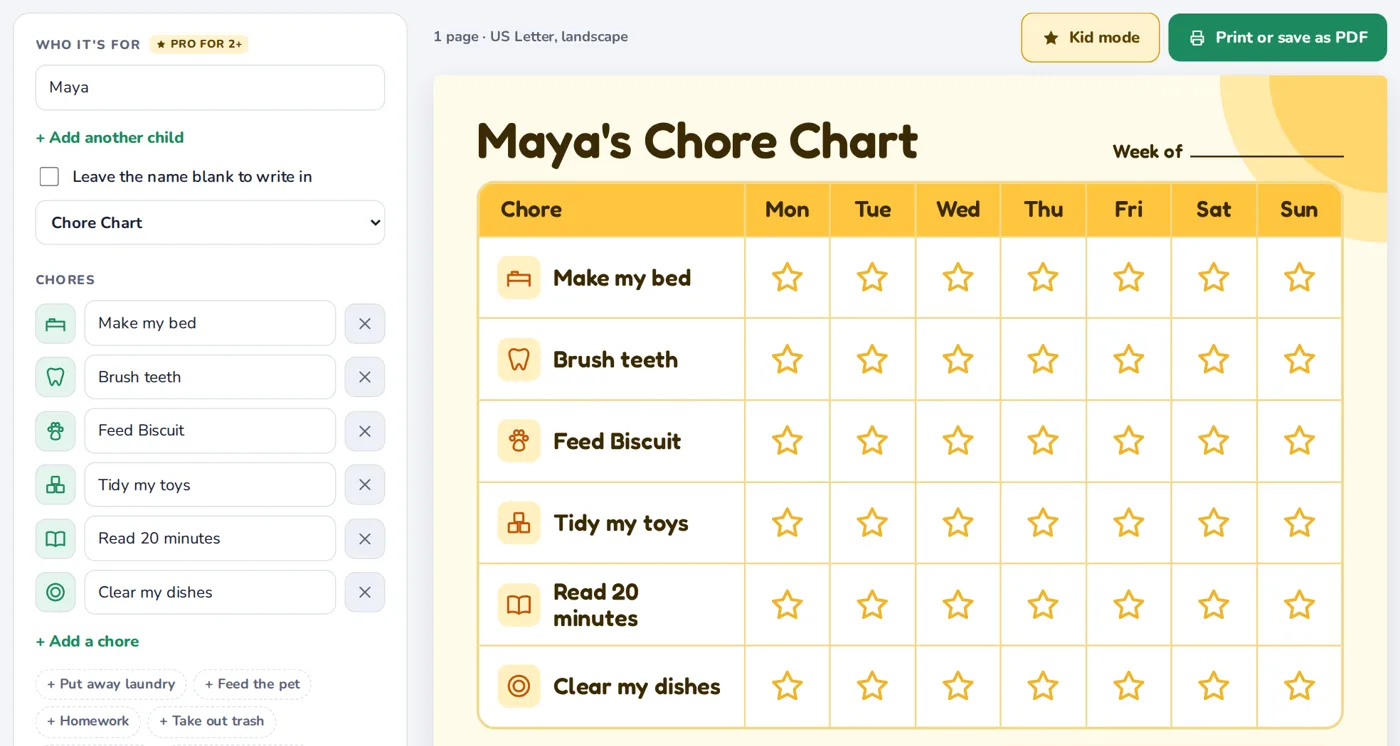
Set it up and print
Type names and chores, pick a look, and print it for the fridge. The big screen makes setup quick.
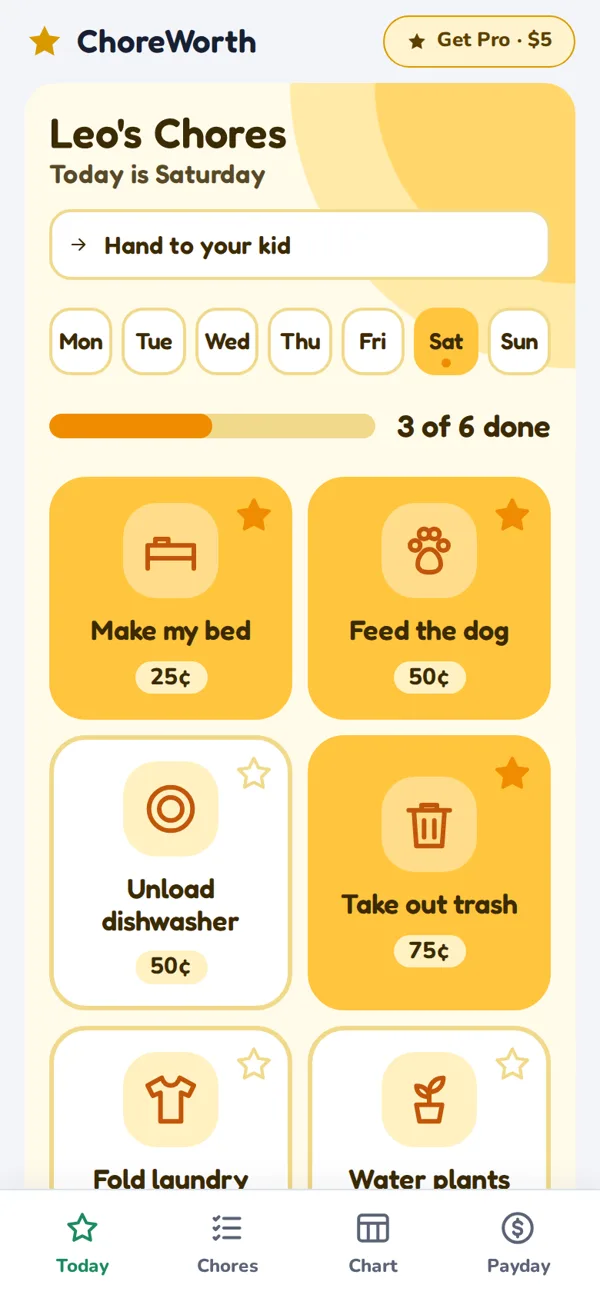
Check in on the go
Today, Chores, Chart and Payday tabs sit at the bottom of the screen. Once it's on your home screen it opens like an app and works offline.
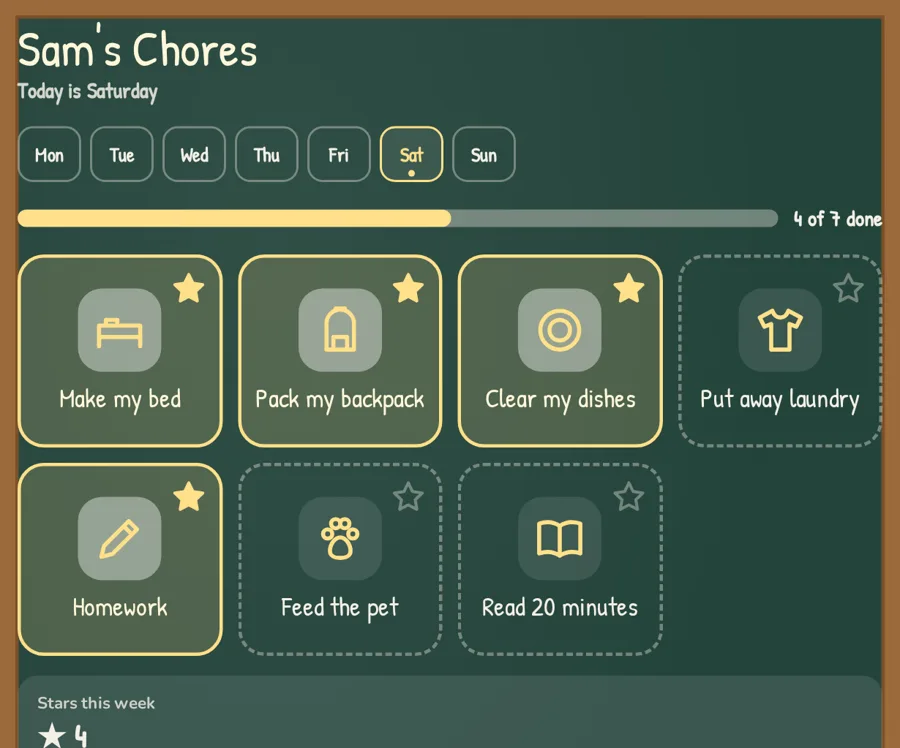
Kid mode on the counter
Big buttons kids can tap themselves. A grown-up presses and holds to leave Kid mode, so little fingers stay put.
Questions parents ask
Is ChoreWorth really free?
Yes. Making, customizing and printing chore charts is free, with no limit. Pro is an optional one-time upgrade for more looks, more kids and weekly payday totals.
Do I need to create an account?
No. There's nothing to sign up for. Open the page and start typing.
Where are my charts saved?
In the web browser on the device you're using. If you clear your browser's data or use a private window, ChoreWorth starts fresh.
Can I use it on more than one device?
Yes. Turn on Family sync on one device to get a family code, then type that code on your other phones and tablets. The chart, checkmarks and payday totals stay the same everywhere. Sync is free for 2 weeks, then part of Pro.
How do I put it on my phone or tablet's home screen?
On iPhone or iPad, open choreworth.com in Safari, tap the Share button, then Add to Home Screen. On Android, tap Install app at the top of the page, or use the menu in Chrome.
How does the allowance part work?
Turn on "Pay for chores" and type an amount next to each chore. The printed chart shows what each check is worth and the most they can earn that week. In Kid mode and the payday calculator, ChoreWorth adds up what they've earned.
What paper sizes can I print?
US Letter and A4, in landscape. You can also save the chart as a PDF from the print window.
How do I get Pro?
Click Get Pro, pay once through Gumroad, and enter the unlock code from your receipt. Pro stays unlocked in that browser. If you lose your code, it's in your Gumroad receipt email.
Is my kids' information private?
Without Family sync, names and chores stay on your device. With Family sync on, your chart is stored on our server under your family code, with no email or account. You can delete it anytime. Read the privacy page.
I have a question or an idea.
We'd love to hear it. Send us a message.